Step-by-Step Guide
1. Install Winamp
If you don't have Winamp installed on your computer, download it here: Winamp for Windows.
2. Download SHOUTcast DSP Plugin
Download the SHOUTcast DSP plug-in for Winamp: SHOUTcast DSP Installer.
3. Prepare Installation
Install Winamp first. Once installed, make sure the program is closed before proceeding with the plugin installation.
4. Install the Plugin
Double-click the installer file you downloaded for the SHOUTcast DSP plugin and follow the onscreen instructions.
5. Open Preferences
Start Winamp and open the Preferences window by pressing CTRL + P.
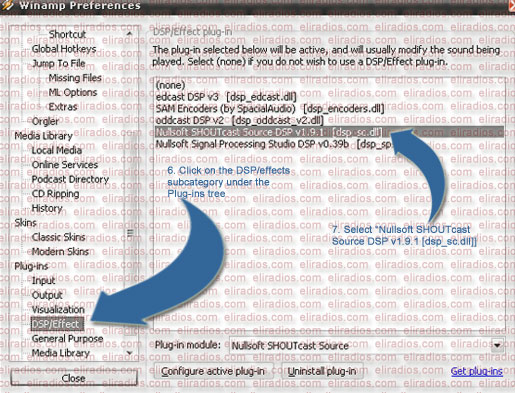
6. Configure SHOUTcast Source
Navigate to DP/Effect in the sidebar and select the SHOUTcast Source plugin. This will open the configuration screen.
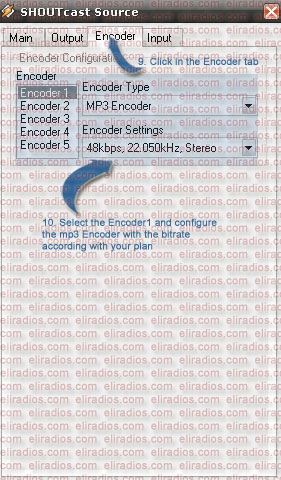
7. Enter Server Information
Configure the plugin with your radio station information (Address, Port, and Password).
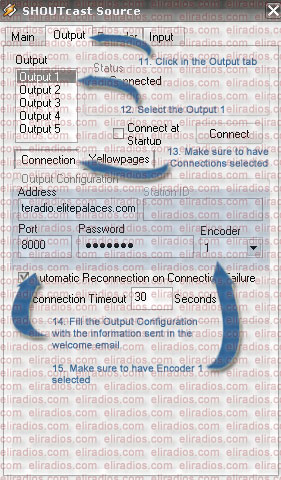
8. Connect and Broadcast
Once properly configured, click Connect. If everything is correct, you will be broadcasting whatever is playing in Winamp to your internet radio station in real time!